

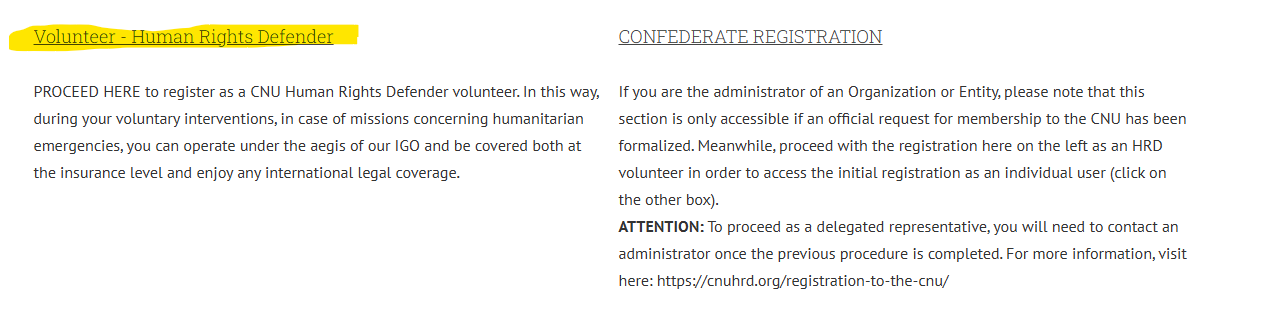

First, select Volunteer and proceed with creating your profile. After that, if you are registering as an entity or organization, at the end of the procedure you will be granted access to Step 3. Please read the instructions below carefully and, if you wish, download the document.


IF YOU ARE REGISTERING AS A VOLUNTEER or Admin/Trustee (Steps 0, 1, 2)

OR TO CREATE AN ACCOUNT AS A TRUSTEE, ADMINISTRATOR OF AN ORGANIZATION, INTERNATIONAL ENTITY, ETC. (Step 3)

Instructions for Proper Registration

After logging in, click on:
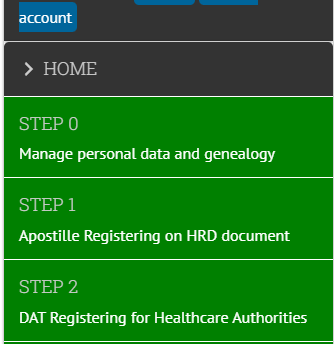
“Step Zero” in the left-hand menu.

  • Complete and upload the required documents.

  • Always save each section individually whenever the save button appears.

  • Once Step Zero is completed, request validation and proceed to the next step.


STEP ONE – EXPLANATION

  • Complete and upload the required documents.

  • Check the Download section for any files needed to complete this step (for example: the template for inserting your photo).

Important notes for Step One:

  • The APOSTILLED HRD DOCUMENT must be completed only if you have chosen to apostille the document issued by CNU for potential missions abroad.

    • If not, proceed directly to the next section concerning Proof of Life.

  • The PROOF OF LIFE DOCUMENT must be mandatorily uploaded.

    • The form can be downloaded from the Download section.

    • Complete it, sign it, and have it officially registered (protocolled) at the registry office of your municipality.

    • If the registry office raises objections, request an equivalent official form directly from them.

This document is required to officially certify that you are alive.

  • Always save each section individually whenever the save button appears.

  • Request validation and proceed to Step Two.


STEP TWO

  • Download the file from the Download area to decide how to manage end-of-life matters.

  • Submit it to the competent authorities and enter the relevant references in this step.

We are fully aware that this is a sensitive subject; however, it is essential that your fundamental rights are protected even under these circumstances.

  • Wait for the validation email before printing the document.

  • Once validated, you may return to your personal area and print the document containing your CNU NUMBER.

  • Print the document.

IMPORTANT:

  • If you are registering as a volunteer, once Step zero-one and two has been validated, the procedure is complete.

  • At the end of the verification process, we will send you your document.

  • In the Download area you will find explanations regarding the document and instructions for its use (available only after Step Two validation).


IF YOU ARE REGISTERING TO CREATE AN ACCOUNT AS A TRUSTEE, ADMINISTRATOR OF AN ORGANIZATION, INTERNATIONAL ENTITY, ETC.

You must first complete the previous three steps: 0, 1, and 2.

Once validation has been received, you may proceed to Step Three.


STEP THREE

  • Enter the details of the entity or group you manage or of which you are the legal representative.

  • Upload the official statute of your entity.

  • If you have an identification code issued by an administrative authority (for example: VAT number, Tax Code, registration number), upload it naming the file accordingly, for example: VAT-ENTITY.

  • Download the available files from the Download area.

  • Once the procedure is complete, click the Request Validation button and wait for confirmation.

You will receive a new document identifying you as Admin/Trustee of the entity or organization you represent.


SE TI STAI REGISTRANDO COME VOLONTARIO (step 0, 1, 2)

O PER CREARE UN ACCOUNT COME TRUSTEE, AMMINISTRATORE DI UN’ORGANIZZAZIONE, ENTE INTERNAZIONALE, ECC. (step 3)

Istruzioni per una corretta iscrizione

Dopo aver effettuato l’accesso, clicca su:
“Step Zero” nel menu a sinistra.

Compila e carica i documenti richiesti.

Salva sempre tutto, sezione per sezione, ogni volta che compare il pulsante di salvataggio.

Una volta completato lo Step Zero, richiedi la validazione e prosegui allo step successivo.

STEP ONE – SPIEGAZIONE

Compila e carica i documenti richiesti.

Verifica la sezione Download per eventuali file utili al completamento di questa fase (ad esempio: modello per l’inserimento della foto).

Importante nello Step One:

  • Il DOCUMENTO HRD APOSTILLATO deve essere compilato solo se hai scelto di apostillare il documento rilasciato dalla CNU per eventuali missioni all’estero. In caso contrario, passa direttamente alla sezione successiva relativa all’Esistenza in Vita.
  • Il documento ESISTENZA IN VITA deve essere obbligatoriamente caricato.
    • Il modulo può essere scaricato dalla sezione Download.
    • Compilalo, firmalo e fallo registrare ufficialmente (protocollare) presso l’ufficio anagrafe del tuo Comune.
    • Se l’ufficio anagrafe solleva obiezioni, richiedi direttamente a loro un modulo equivalente.

Questo documento è necessario per certificare ufficialmente la tua effettiva esistenza in vita.

Salva sempre tutto, sezione per sezione, ogni volta che compare il pulsante di salvataggio, richiedi validazione e procedi allo Step Two.

STEP TWO

Scarica il file dall’area Download per decidere come gestire le questioni di fine vita.

Invialo alle autorità competenti e riporta in questo step i relativi riferimenti.

Siamo pienamente consapevoli che si tratta di un argomento delicato, ma è importante che i tuoi diritti fondamentali siano tutelati anche in queste circostanze.

Attendi l’email di validazione per poter stampare il documento.
Successivamente potrai tornare nella tua area personale e stampare il documento con il tuo NUMERO CNU.
Stampa il documento.

IMPORTANTE:

  • Se ti stai registrando come volontario, una volta che lo Step zero, uno e due sarà stato validato, la procedura è conclusa.
  • Al termine del processo di verifica, ti invieremo il tuo documento.
  • Nell’area Download troverai le spiegazioni relative al documento e alle modalità di utilizzo (solo dopo la convalida dello step 2).

SE TI STAI REGISTRANDO PER CREARE UN ACCOUNT COME TRUSTEE, AMMINISTRATORE DI UN’ORGANIZZAZIONE, ENTE INTERNAZIONALE, ECC.

Devi prima completare i 3 steps precedenti: 0, 1, 2
Una volta ricevuta la validazione, potrai procedere con lo Step tre.


STEP THREE

Inserisci i dati dell’ente o del gruppo che amministri o di cui sei il rappresentante legale.

Carica lo statuto ufficiale del tuo ente.

Se disponi di un codice identificativo rilasciato da un’autorità amministrativa (ad esempio: Partita IVA, Codice Fiscale, numero di registrazione), caricalo denominandolo, ad esempio: P.IVA-ENTE.

Scarica i file disponibili nell’area Download.

Una volta completata la procedura, clicca sul pulsante di richiesta validazione e attendi la conferma.


!!!IMPORTANT!!!

Italiano

Se ti stai iscrivendo come Trustee o admin di un Ente o organizzazione, ricorda di versare la quota o la tua iscrizione non sarà elaborata. Leggi bene qui: clicca

Inglese
If you are registering as a Trustee or as an administrator of an Entity or organization, please remember to pay the required fee, otherwise your registration will not be processed. Read carefully here: click.

Spagnolo
Si te estás inscribiendo como Trustee o como administrador de una Entidad u organización, recuerda realizar el pago de la cuota, de lo contrario tu inscripción no será tramitada. Lee atentamente aquí: haz clic.

Francese
Si tu t’inscris en tant que Trustee ou administrateur d’une Entité ou organisation, n’oublie pas d’effectuer le versement de la cotisation, faute de quoi ton inscription ne sera pas traitée. Lis attentivement ici : clique.